01This is the one I was waiting for
Google officially launched Nano Banana 2 Lite, and honestly this is the version I've been waiting for — the one that actually makes sense for everyday use.
The expensive, powerful models look great in demos. But when I'm actually making thumbnails, blog covers, ad ideas, app mockups, product shots, or quick client concepts, I don't want to wait forever or count pennies every time I tweak a prompt. I want to generate, reject, tweak, and move on.
That's why Nano Banana 2 Lite matters. It's not trying to be the most powerful Gemini image model. It's trying to be the one I can reach for again and again without overthinking it.
Google says it's the fastest and most cost-efficient Gemini image model so far. The model name is gemini-3.1-flash-lite-image, and it's in Google AI Studio, the Gemini API, and Gemini Enterprise Agent Platform. They're also rolling it out across consumer surfaces — AI Mode in Search, the Gemini app, Google Photos, NotebookLM, Stitch, Flow, and Google Ads.
The official launch post is here: Start building with Nano Banana 2 Lite and Gemini Omni Flash.
02What Nano Banana 2 Lite actually is
Nano Banana 2 Lite is the speed-and-cost version of Google's current image lineup. Google says it can deliver text-to-image outputs in around 4 seconds, with pricing at $0.034 per 1K-resolution image.
That sounds like a small technical detail until you've actually worked with image AI. Most image work isn't one perfect prompt. It's messy. I generate ten drafts, reject eight, tweak two, then maybe send one into a stronger model or a video model.
When every generation feels expensive or slow, you get careful too early. You start trying to write the perfect prompt instead of exploring. Fast, cheap models fix that — they let you be a little messy at the start, which is usually where the better ideas show up.
Google is also positioning it as the replacement for the original Nano Banana model, which was officially Gemini 2.5 Flash Image. So if you were using gemini-2.5-flash-image for fast image generation or editing, this is the upgrade path Google wants you to take.
03The prompt I tested
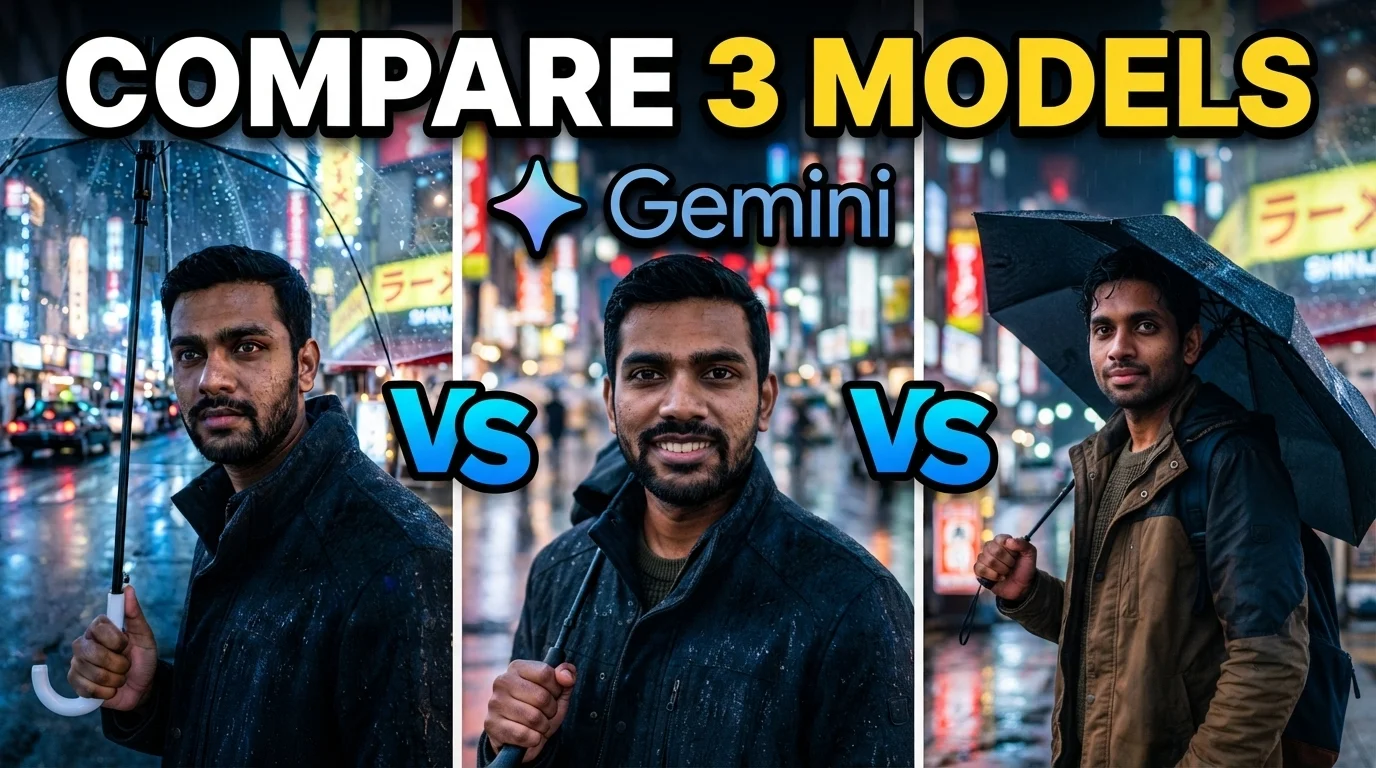
To make this less theoretical, I tested the same cinematic portrait prompt across the Gemini image models through OpenRouter.
Prompt: "A 28-year-old Indian man standing on a rainy street in Tokyo at night, neon reflections on wet pavement, shallow depth of field, cinematic lighting, ultra-realistic skin texture, detailed eyes, 85mm lens, photorealistic"
This is a good test because it asks for multiple things at once: a realistic Indian face, Tokyo street atmosphere, rain, neon reflections, shallow depth of field, and a cinematic 85mm portrait look. Models often fail one of these while getting the rest right.
04Example 1: Gemini 3.1 Flash Image
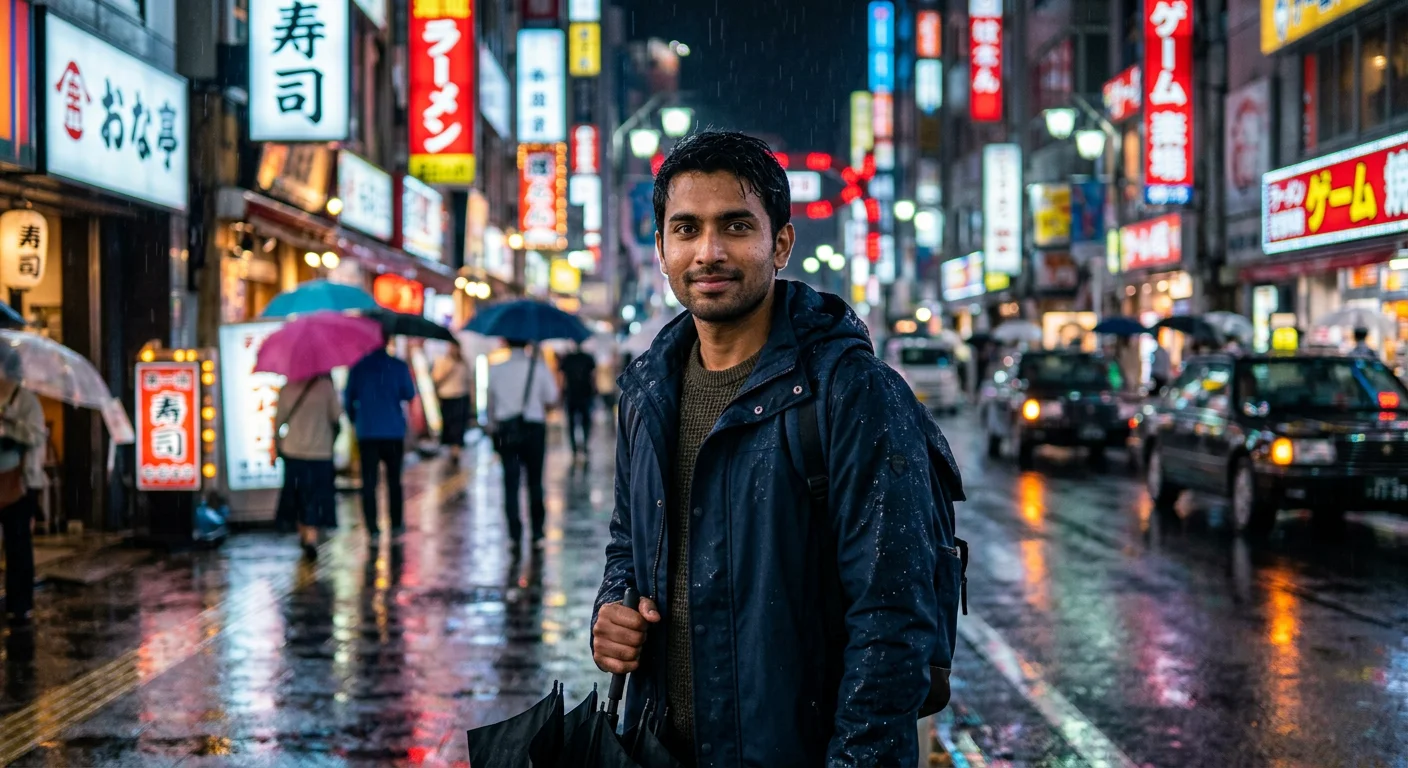
Model used: google/gemini-3.1-flash-image. In my test, this usually took around 5 to 15 seconds.
This output feels more composed to me. The face is clean, the neon signs and wet-road reflections sell the Tokyo night mood, and the subject still looks like the main focus instead of getting swallowed by the background.
This is the kind of output I would be more comfortable using as a serious blog cover, ad concept, or client draft without needing too many extra generations.
05Example 2: Gemini 3.1 Flash Lite Image
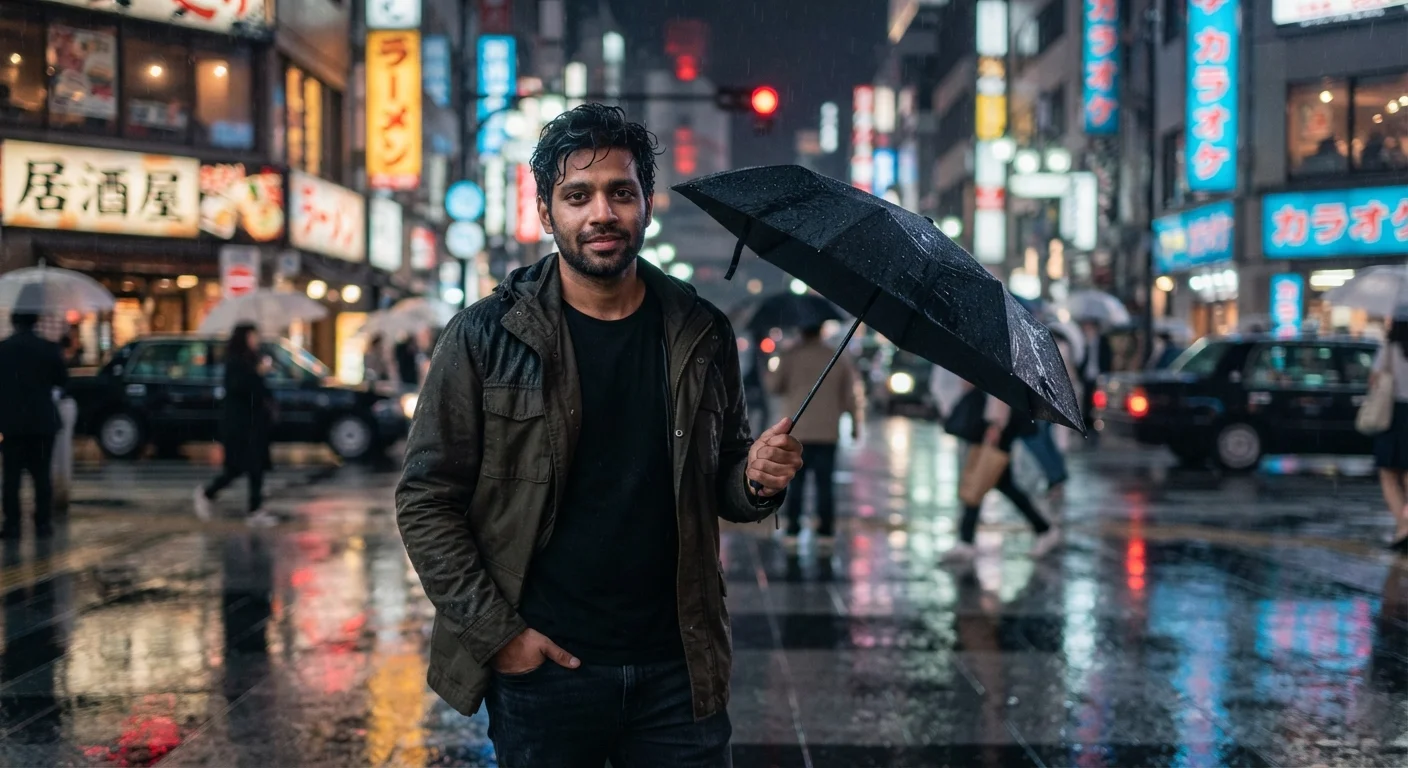
Model used: google/gemini-3.1-flash-lite-image. In my test, this usually took around 3 to 6 seconds.
The Lite output is honestly better than I expected for the faster model. It keeps the rainy Tokyo mood, the umbrella adds a nice story detail, and the neon reflections still work.
But compared with the Flash Image result, it feels a little more like a fast draft. Still very usable, especially if you're generating multiple thumbnail or social post directions quickly.
06Example 3: Gemini 3 Pro Image
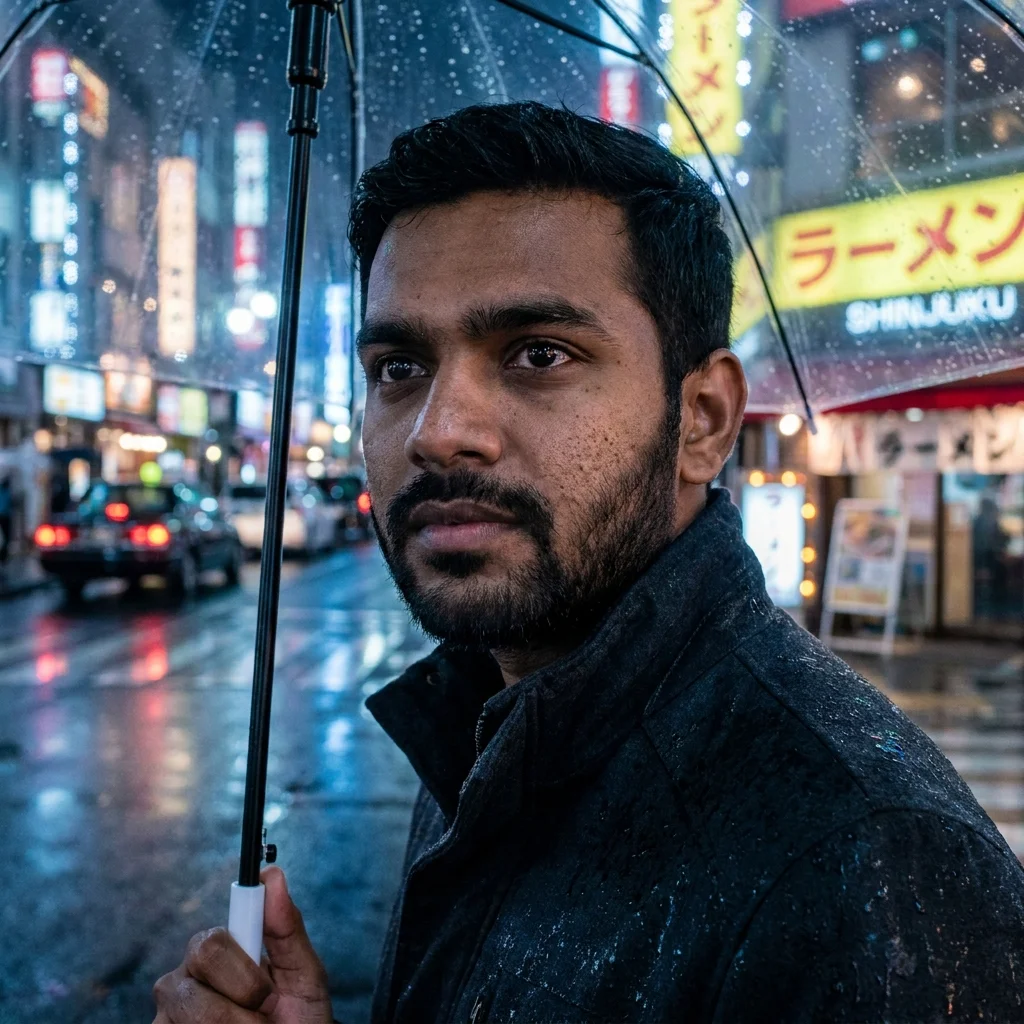
Model used: google/gemini-3-pro-image. In my test, this usually took around 5 to 15 seconds.
This one goes much closer on the face and feels more like a dramatic portrait than a full street scene. The skin texture, eyes, rain on the umbrella, and background blur are all stronger.
The trade-off is that it follows a slightly different composition from the first two outputs. For a final portrait or hero image, I like this. For comparing full-body street-scene detail, the Flash Image output gives more context.
07The three Gemini image models to understand
The useful comparison is not Lite vs every random image tool on the internet. The better question is: where does Lite fit inside Gemini's own image family?
Nano Banana 2 Lite, officially Gemini 3.1 Flash Lite Image, is the quick-draft model. This is the one I would reach for when I need variations, ad concepts, YouTube thumbnail ideas, social post directions, app-generated images, or bulk creative exploration.
Nano Banana 2, officially Gemini 3.1 Flash Image, is the balanced model. It's the safer middle option when you want stronger output than Lite but still care about speed and cost. If I were building a real product feature where users are waiting for the result, I would test Nano Banana 2 seriously.
Nano Banana Pro, officially Gemini 3 Pro Image, is the high-control model. This is the one I would save for final campaign visuals, detailed compositions, brand work, or anything where text rendering and scene accuracy matter more than getting 50 quick options.
08Lite vs Nano Banana 2
Nano Banana 2 Lite wins on speed and price. That's the whole reason it exists. If I'm building a tool where users expect near-instant results, Lite is the obvious first model to test.
Nano Banana 2 is where I go when the image needs more polish — product mockups, cleaner social creative, consistent character scenes, visuals where the first output needs to be closer to usable. I'll probably generate fewer images, but each one has a better chance of being good enough.
My simple rule: use Lite when the question is "show me options quickly." Use Nano Banana 2 when the question is "give me something I can actually use."
09Lite vs Nano Banana Pro
Nano Banana Pro is not the model I would use for every prompt. That would be overkill. Pro is for the moments where mistakes are expensive.
Use Pro when the prompt is complex, the visual has many requirements, the image needs readable text, or the output will represent a client or brand publicly. If the result needs to be accurate more than it needs to be instant, Pro makes sense.
The workflow I like is simple: draft with Lite, shortlist the strongest direction, then move the winning idea into Pro for the final version. That gives you speed early and quality later.
10Which one I would use
For creators, I'd start with Nano Banana 2 Lite. If you make YouTube thumbnails, Instagram concepts, ad hooks, blog covers, or product ideas, the 4-second generation time matters more than perfect detail on the first try.
For developers building an app, Lite is also the easiest model to justify. Low cost and low latency make it better for experimentation, free tiers, previews, and high-volume generation. You can always offer Nano Banana 2 or Pro as an upgrade path for final exports.
For agencies and client work, I wouldn't rely only on Lite. Use it for ideation, then push the final direction through Nano Banana 2 or Pro. Clients don't care that the first draft was generated cheaply. They care that the final image looks intentional.
11The comparison in plain English
- Nano Banana 2 Lite: fastest and cheapest. Best for drafts, bulk generation, prototypes, thumbnails, social ideas, and apps that need quick results.
- Nano Banana 2: best balance. Use it when you want stronger quality but still need reasonable speed and cost.
- Nano Banana Pro: strongest control. Use it for final production visuals, complex prompts, accurate text, brand work, and professional creative tasks.
| Model | Best for | My test timing | Strength | Trade-off | My pick when |
|---|---|---|---|---|---|
| Nano Banana 2 Lite | Drafts, bulk ideas, thumbnails, app previews, quick social concepts | 3 to 6 seconds | Fastest and cheapest option. Google says around 4 seconds for text-to-image. | Not the highest-polish model in the family. | I need many options quickly and I'm still exploring the direction. |
| Nano Banana 2 | Usable creative output, product mockups, polished social visuals, balanced app features | 5 to 15 seconds | Better balance of quality, speed, and cost. | Slower and likely more expensive than Lite. | I want something closer to final without jumping straight to Pro. |
| Nano Banana Pro | Final campaign visuals, brand work, complex prompts, accurate text-heavy images | 5 to 15 seconds | Highest control and strongest fit for professional use cases. | Overkill for quick drafts and early ideation. | The image represents a client, brand, or public-facing campaign. |
12The bigger thing Google is doing
The launch is not just about one image model. Google also announced Gemini Omni Flash for video generation and conversational editing. The interesting workflow is chaining them: generate a fast image with Nano Banana 2 Lite, then use Omni Flash to animate it into video.
That's the direction AI creative tools are moving: not one giant model for everything, but a pipeline. Fast image draft, better image refinement, video generation, then conversational edits. For creators and developers, that's more useful than one expensive model that tries to do every step.
This is also where I think Google has a strong angle. Gemini is not just a chat app anymore. It's turning into a creative stack: Lite for speed, Nano Banana 2 for balance, Pro for precision, and Omni Flash for video.
13My final take
Nano Banana 2 Lite is probably not the model that makes the most beautiful single image in the Gemini family. That's not the job.
Its job is to make image generation cheap enough and fast enough that you stop treating every prompt like a precious attempt. For real creative work, that matters a lot. The best idea usually appears after five bad drafts and three almost-good ones.
If you're building with Gemini image models in 2026, I'd treat Nano Banana 2 Lite as the default starting point, Nano Banana 2 as the balanced production option, and Nano Banana Pro as the final-polish model when quality matters more than speed.