
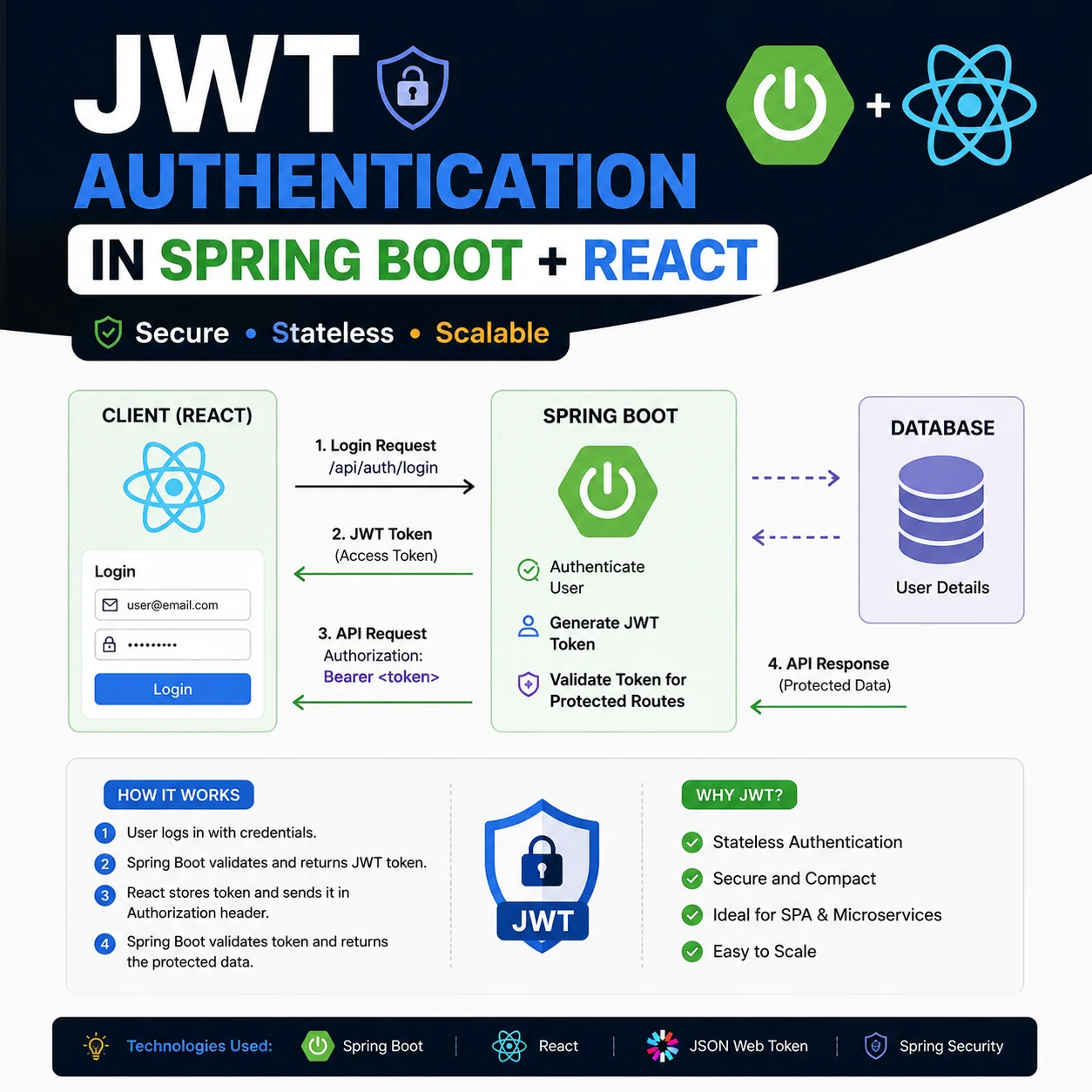
01Why Most JWT Setups Are Broken
JWTs are the standard for modern API auth. But look at how most devs implement them and you'll find serious security holes. The most common mistake? Storing access tokens in `localStorage`.
If your access token lives in `localStorage`, any third-party script, analytics tag, or npm dependency can grab it with one line of JavaScript. That's an XSS attack waiting to happen. Here's how I set up a production-ready JWT pipeline with Spring Boot and React — short-lived tokens, rotating refresh tokens, HttpOnly cookies.
02Access vs. Refresh Tokens
Two tokens, two lifecycles:
1. Access Token: Short-lived (15 minutes). Authenticates API requests. Stored in-memory in a React state variable — external scripts can't touch it via XSS.
2. Refresh Token: Long-lived (7 days). Requests a new access token when the current one expires. Stored in an HttpOnly, Secure, SameSite=Strict cookie. JavaScript can't read it (XSS protection), and SameSite blocks CSRF.
Authentication Pipeline:
User Login -> Server Validates Credentials -> Generates Access + Refresh Tokens
  ├── Access Token -> Sent as JSON response -> React stores in component state
  └── Refresh Token -> Set as HTTPOnly Cookie -> Stored securely by browser

API Call -> React attaches Access Token to 'Authorization: Bearer <token>' header
Token Expired (401) -> React Axios Interceptor catches error -> Requests '/refresh'
Refresh Success -> New Access Token set in memory -> Retries original API call silently031. Backend: Maven Dependencies
First, add the JWT utility libraries (JJWT) and Spring Security to your `pom.xml`:
<dependency>
    <groupId>io.jsonwebtoken</groupId>
    <artifactId>jjwt-api</artifactId>
    <version>0.11.5</version>
</dependency>
<dependency>
    <groupId>io.jsonwebtoken</groupId>
    <artifactId>jjwt-impl</artifactId>
    <version>0.11.5</version>
</dependency>
<dependency>
    <groupId>io.jsonwebtoken</groupId>
    <artifactId>jjwt-jackson</artifactId>
    <version>0.11.5</version>
</dependency>
<dependency>
    <groupId>org.springframework.boot</groupId>
    <artifactId>spring-boot-starter-security</artifactId>
</dependency>042. Backend: The JwtUtil Class
Next, the `JwtUtil` class. It handles token generation, claims extraction, expiration checks, and signature verification with your secret key:
@Component
public class JwtUtil {

    @Value("${jwt.secret}")
    private String secret;

    @Value("${jwt.access-token-expiration}")
    private Long accessTokenExpiration;

    public String generateAccessToken(String username) {
        return Jwts.builder()
            .setSubject(username)
            .setIssuedAt(new Date())
            .setExpiration(new Date(System.currentTimeMillis() + accessTokenExpiration))
            .signWith(getSigningKey(), SignatureAlgorithm.HS256)
            .compact();
    }

    public String extractUsername(String token) {
        return extractClaim(token, Claims::getSubject);
    }

    public boolean isTokenValid(String token, String username) {
        return username.equals(extractUsername(token)) && !isTokenExpired(token);
    }

    private boolean isTokenExpired(String token) {
        return extractExpiration(token).before(new Date());
    }

    private Key getSigningKey() {
        byte[] keyBytes = Decoders.BASE64.decode(secret);
        return Keys.hmacShaKeyFor(keyBytes);
    }
}053. Frontend: Axios Interceptors in React
You don't want to boot users to the login page every time an access token expires mid-session.
Axios interceptors handle it. The request interceptor attaches the in-memory access token to every outgoing call. The response interceptor catches 401s, hits the refresh endpoint, saves the new access token in memory, and retries the original request — user never notices:
import axios from 'axios';

const API_BASE_URL = 'http://localhost:8080/api';
let accessToken = null;

const api = axios.create({
  baseURL: API_BASE_URL,
  withCredentials: true, // Crucial to send HttpOnly cookies automatically
});

api.interceptors.request.use(
  (config) => {
    if (accessToken) {
      config.headers.Authorization = `Bearer ${accessToken}`;
    }
    return config;
  }
);

api.interceptors.response.use(
  (response) => response,
  async (error) => {
    const originalRequest = error.config;
    if (error.response?.status === 401 && !originalRequest._retry) {
      originalRequest._retry = true;
      try {
        const { data } = await axios.post(
          `${API_BASE_URL}/auth/refresh`,
          {},
          { withCredentials: true }
        );
        accessToken = data.accessToken;
        originalRequest.headers.Authorization = `Bearer ${accessToken}`;
        return api(originalRequest);
      } catch (refreshError) {
        // Refresh token expired, redirect user to login
        window.location.href = '/login';
        return Promise.reject(refreshError);
      }
    }
    return Promise.reject(error);
  }
);

export default api;06Production Checklist and Logout
Before you ship, set these cookie attributes on the server when sending the refresh token:
1. HttpOnly: Blocks client-side JavaScript access.
2. Secure: Cookie only goes over HTTPS.
3. SameSite=Strict: Won't send the cookie on cross-site requests — kills CSRF.
Logout is trickier. JWTs are stateless — you can't just 'delete' a token. On logout I delete the cookie from the browser and write the token signature to a Redis blacklist with an expiration matching the token's remaining lifetime. Any API call with a blacklisted signature gets rejected immediately.
Ship this flow and your sessions will be solid without feeling clunky.
07The refresh endpoint on Spring Boot
The `/auth/refresh` route reads the HttpOnly cookie server-side, validates the refresh token signature and expiry, optionally rotates it, and returns a fresh access token as JSON. The client never sees the refresh token string — only the new access token for memory storage.
Rotation matters: every refresh issues a new refresh token and invalidates the old one. If someone steals a refresh cookie and you rotate on each use, the legitimate user’s next refresh fails and you know something leaked. That is extra Redis or DB work, but it is the pattern I use on anything handling payments or PII.
08Spring Security filter order
Wire a `OncePerRequestFilter` before `UsernamePasswordAuthenticationFilter` that extracts the Bearer token, validates it with `JwtUtil`, and sets the SecurityContext. Public routes — login, register, refresh — stay on a permit list. Everything else requires a valid access token.
The mistake I see most often is validating JWT in the controller instead of the filter chain. Controllers get skipped by mistake, tests bypass auth, and suddenly one endpoint is public. Centralize validation once.
09What broke on my first deploy
CORS. React on `localhost:5173` calling Spring on `8080` without `allowCredentials: true` meant cookies never stuck. Fix: explicit CORS config with credentials enabled and exact origin list — not `*` when cookies are involved.
Second bug: access token in memory wiped on full page refresh. Users logged out constantly. I added a silent refresh on app boot — if refresh cookie exists, call `/auth/refresh` before rendering protected routes. Small UX detail, big retention difference.
10AuthController endpoints I expose
`POST /auth/login` — validates credentials, returns access token JSON, sets refresh HttpOnly cookie. `POST /auth/refresh` — cookie in, new access token out. `POST /auth/logout` — clears cookie, blacklists current refresh token in Redis.
Keep login and refresh on the same site parent domain so SameSite cookies work. Cross-subdomain auth needs explicit cookie domain config — I learned that the hard way on a staging subdomain that never received cookies.
11Testing the flow locally
Use two browsers: one logged in, one incognito. Let the access token expire (or shorten expiry to 1 minute in dev), then trigger an API call — the interceptor should refresh silently. If you see a login redirect, log the refresh response status first.
I also test logout on two tabs: logout in tab A should blacklist the refresh token so tab B's next API call fails auth. That catches Redis blacklist bugs before production.
12React AuthProvider pattern
I wrap the app in an `AuthProvider` that holds access token state, exposes `login`, `logout`, and `refreshSession`, and calls `/auth/refresh` on mount if a session might exist. Protected routes check `isAuthenticated` before rendering — not just whether a token string exists in memory from a previous tab.
Keep token state in React context, not global variables outside React. Strict Mode double-mounting in dev exposed bugs where I initialized token from a module-level variable that leaked between test runs.
13Spring Boot SecurityConfig sketch
My `SecurityFilterChain` permits `/auth/**`, disables CSRF for stateless JWT APIs (cookie refresh uses SameSite instead), and registers the JWT filter before username/password auth. Session creation policy is `STATELESS` — no server sessions, only tokens.
If you need CSRF for cookie-based form login alongside JWT APIs, split controllers: form login on one chain, API on another. Mixing patterns in one chain creates surprises.
@Bean
SecurityFilterChain filterChain(HttpSecurity http) throws Exception {
  http.csrf(csrf -> csrf.disable())
      .sessionManagement(s -> s.sessionCreationPolicy(STATELESS))
      .authorizeHttpRequests(auth -> auth
          .requestMatchers("/auth/**").permitAll()
          .anyRequest().authenticated())
      .addFilterBefore(jwtAuthFilter, UsernamePasswordAuthenticationFilter.class);
  return http.build();
}14Production secrets and key rotation
Store `jwt.secret` in environment variables, not `application.properties` in git. Rotate by accepting two signing keys briefly during migration — old tokens validate until expiry, new tokens use the new key.
Document access token TTL and refresh TTL in your README so frontend and mobile teams do not guess. I use 15 minutes / 7 days as a default that balances security and UX.