
01LCP is usually an image problem
Largest Contentful Paint (LCP) is the Core Web Vital that actually shows up in Search Console and real audits. It's when the biggest thing on screen — usually a hero image, sometimes a banner or a big headline block — finishes rendering. Cross 2.5 seconds and Google treats your site as slow, which hits rankings and conversions in ways you'll notice.
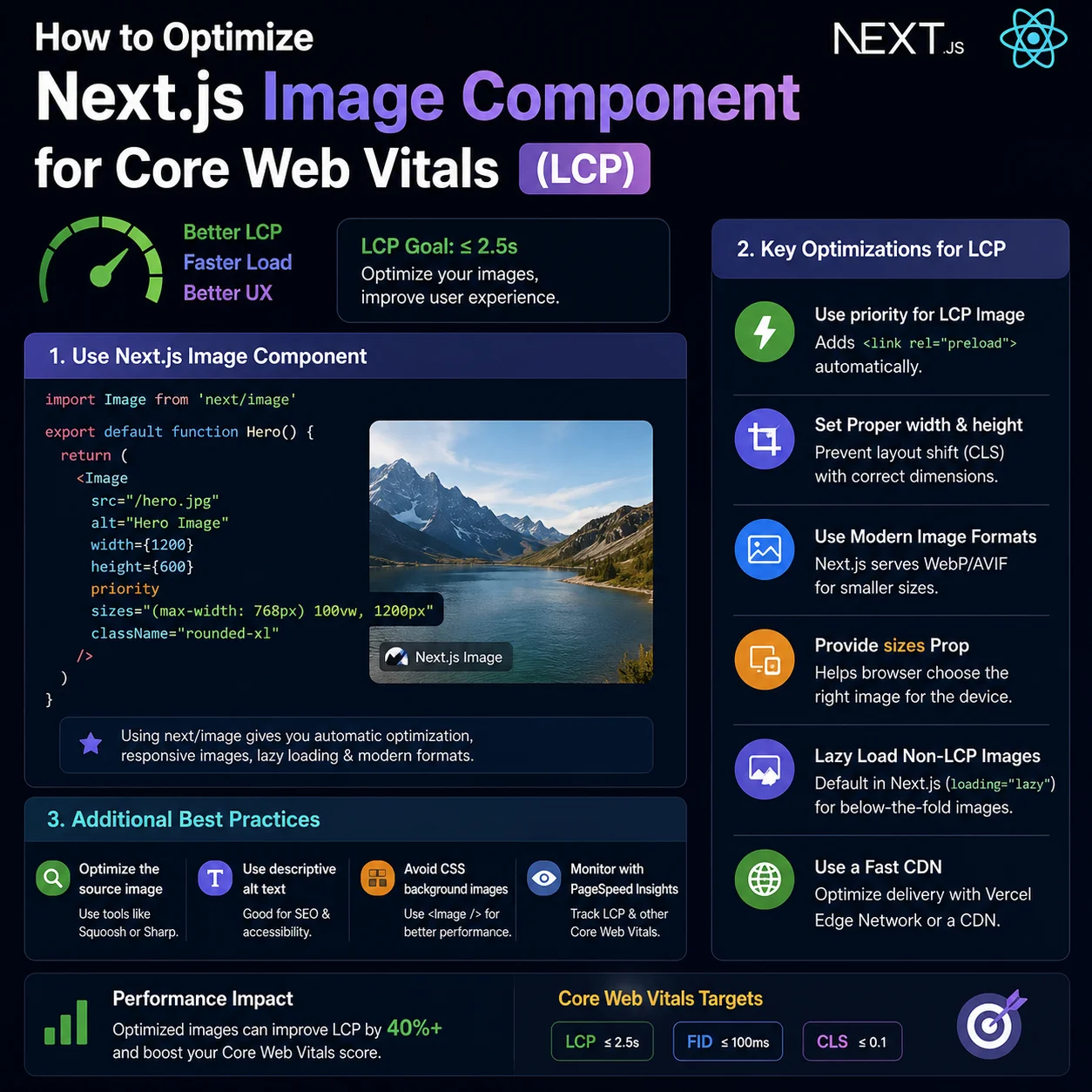
In the audits I've run, more than 80% of bad LCP traces come back to images. Next.js gives you `next/image`, which is genuinely good, but I've misconfigured it plenty of times myself. Import the component, drop in a URL, assume it works — then wonder why you're getting layout shift, double downloads, and LCP warnings. Here's what I changed to get sub-second LCP on real devices.
02The sizes attribute actually matters
If you use `fill` and skip `sizes`, the browser doesn't know how big the image will be until CSS loads. Next.js plays it safe and serves a fat desktop image to everyone — so someone on cellular is downloading a 2000px asset for no reason.
The `sizes` attribute tells the preload scanner what width to expect at different breakpoints before stylesheets arrive. That lets the browser pick the right file from `srcSet`. This is the hero config I landed on after breaking it a few times:
import Image from 'next/image';

export default function HeroBanner() {
  return (
    <div className="relative w-full h-[400px] md:h-[500px]">
      <Image
        src="/images/hero-banner.jpg"
        alt="Optimized portfolio homepage header banner"
        fill
        priority
        sizes="(max-width: 768px) 100vw, (max-width: 1200px) 50vw, 33vw"
        className="object-cover"
      />
    </div>
  );
}03Don't let images jump around (CLS)
Cumulative Layout Shift (CLS) is when stuff moves while the page is still loading. It's annoying as a user and Google penalizes it.
For fixed-size images, pass explicit `width` and `height`. Next.js uses those to reserve space so nothing jumps. With `fill`, wrap the image in a parent with a locked aspect ratio — `aspect-ratio: 16 / 9` or similar — so the box exists before the bytes arrive.
Also watch parent elements with margin or height rules that change after hydration. Lock the aspect ratio in CSS from the start and the layout stays stable.
04When sharp isn't enough
Out of the box, Next.js runs images through `sharp` and spits out WebP/AVIF on demand. That works until you're resizing hundreds of images on a small VPS or a cold serverless function. I've seen CPU peg and response times crawl from exactly this.
On higher-traffic sites I push compression to a dedicated image CDN — Cloudinary, Imgix, CloudFront with Lambda@Edge, whatever you're already paying for. Your Next.js app stops doing image math, latency drops, and scaling images doesn't mean scaling your entire node.
05Blur placeholders buy you time
Sometimes the network is just slow and there's nothing left to optimize away. Perceived speed still matters — users bounce when they stare at empty boxes.
`placeholder="blur"` gives you a tiny base64 smear instantly and crossfades to the real image when it lands. For remote URLs, I generate blur data server-side with `sharp` or `plaiceholder` and pass it as `blurDataURL`. It won't fix bad LCP by itself, but the page feels alive instead of broken.
// Server-side base64 blur generation sample
import { getPlaiceholder } from 'plaiceholder';

export async function getStaticProps() {
  const { base64, img } = await getPlaiceholder('/images/hero-banner.jpg');
  return {
    props: {
      imageProps: {
        ...img,
        blurDataURL: base64,
        placeholder: 'blur'
      }
    }
  };
}06priority is not free — use it once
Add `priority` only to the one image that actually drives LCP — usually the hero or the blog header image above the fold. Slap priority on every thumbnail and you compete with yourself for bandwidth.
On sinhaabhinav.in blog posts I set `fetchPriority="high"` on the header image in the article template and leave related-post images lazy. That single change moved mobile LCP from "needs improvement" to green on PageSpeed for several templates.
07Numbers from my own site
Before fixing `sizes` and WebP delivery, a 840px-wide blog hero was still downloading a 1920px asset on phones. After correct `sizes="(max-width: 768px) 100vw, 840px"` and `.webp` sources, the transferred bytes dropped by roughly 70% on a mid-range Android device I test on.
LCP improved from about 3.4s to under 2.1s on the same post — not because of magic, but because the browser finally fetched the right file the first time.
08Blog thumbnails deserve the same rules
Index pages are easy to ignore because no single image is "the hero." But the first visible card image still counts for perceived speed. I use fixed width/height on blog cards, WebP assets in `/public/blog/`, and lazy loading for everything below the first row.
If you run AdSense, slow list pages hurt too — reviewers scroll the blog index. Treat card images like product thumbnails: consistent aspect ratio, no layout jump, no oversized files.
09Remote images and the domains config
If your LCP image comes from a CDN or CMS domain, add it to `images.remotePatterns` in `next.config.mjs`. Without that, `next/image` falls back to a plain `<img>` or breaks the build — and you lose automatic optimization exactly where you need it.
I keep a short allowlist: my own domain, Cloudinary if used, and nothing else. Fewer allowed domains means fewer surprises if someone injects an external image URL through CMS content.
10Measuring LCP in Search Console vs lab tools
PageSpeed Insights is useful for debugging, but Search Console LCP is field data from real users. I compare both: if lab scores are green but field LCP is red, the problem is often cache, slow regions, or ads loading before the hero image.
Fix the hero first, then retest on a mid-tier Android phone on 4G — not just your MacBook on Wi-Fi. That is closer to what Google’s field data sees for most Indian traffic.