
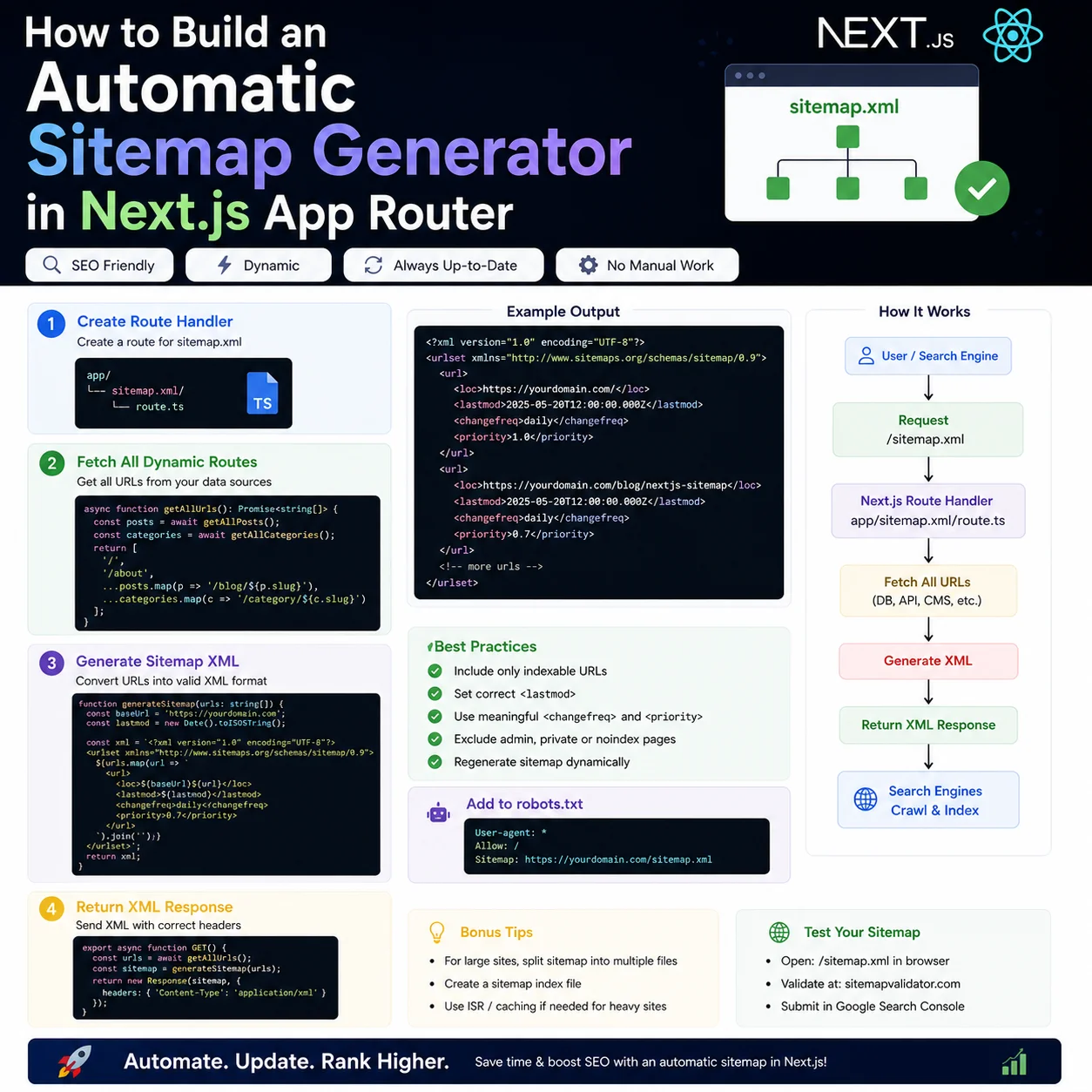
01I got tired of forgetting to update sitemap.xml
Search bots want a sitemap. For a blog or portfolio, that means every new post should show up in `sitemap.xml` so Google and Bing can find it. I kept forgetting to edit the file manually — new posts would go live and sit unindexed for days.
Next.js App Router lets you generate the sitemap at build or request time with a `sitemap.js` file. Add a post to your data, redeploy, done. No more stale XML sitting in the repo.
02The sitemap.js file
Drop `sitemap.js` (or `.ts`) in your `app/` directory and Next.js serves `/sitemap.xml` from whatever the default export returns.
Each entry needs `url`, `lastModified`, `changeFrequency`, and `priority`. Here's the skeleton I started from:
export default async function sitemap() {
  const baseUrl = 'https://sinhaabhinav.in';
  return [
    {
      url: baseUrl,
      lastModified: new Date(),
      changeFrequency: 'daily',
      priority: 1.0,
    },
    {
      url: `${baseUrl}/about`,
      lastModified: new Date(),
      changeFrequency: 'monthly',
      priority: 0.8,
    }
  ];
}03Pull blog URLs from your constants
The useful part is mapping over your blog metadata — same array you use for the index page — and emitting a URL per slug.
New post in the array, new URL in the sitemap. No second place to maintain:
import { BLOG_POSTS_META } from '../constants/blogPostMeta';

export default async function sitemap() {
  const baseUrl = 'https://sinhaabhinav.in';

  const blogUrls = BLOG_POSTS_META.map(post => ({
    url: `${baseUrl}/blog/${post.slug}`,
    lastModified: new Date(post.date),
    changeFrequency: 'weekly',
    priority: 0.7,
  }));

  const staticUrls = [
    { url: baseUrl, lastModified: new Date(), changeFrequency: 'daily', priority: 1.0 },
    { url: `${baseUrl}/about`, lastModified: new Date(), changeFrequency: 'monthly', priority: 0.8 },
    { url: `${baseUrl}/tools`, lastModified: new Date(), changeFrequency: 'weekly', priority: 0.8 }
  ];

  return [...staticUrls, ...blogUrls];
}04Multi-language alternates if you need them
If you ship localized routes — `/es/blog/post` alongside `/blog/post` — add an `alternates` field on each entry so crawlers know they're the same page in different languages.
Google uses that to pick the right URL for the user's locale instead of treating them as duplicate content.
05force-static so crawlers don't hammer your DB
Crawlers don't care about client-side React. They want XML. If your sitemap hits the database on every request, you're doing unnecessary work.
Export `const dynamic = 'force-static'` from `sitemap.js` and Next.js bakes the XML at build time. Bots get a cached file instantly; your origin doesn't get spike traffic every time Google recrawls.
06Wire robots.txt to the sitemap
A sitemap nobody discovers is half useless. In App Router I use `robots.js` to emit `Sitemap: https://sinhaabhinav.in/sitemap.xml` and allow crawlers on `/blog/*`. That single line shows up in Search Console and saves you from maintaining a static robots file by hand.
After deploy, open `/sitemap.xml` in the browser and count URLs. If a new post is missing, the bug is almost always "forgot to add the slug to blogPostMeta" — not the sitemap generator itself.
07Submit once, then let deploys do the work
I submit the sitemap in Google Search Console after major launches, not on every typo fix. Day-to-day, adding a row to `blogPostMeta.js` and redeploying is enough because `lastModified` comes from the post date.
For Bing Webmaster Tools I do the same — it matters if you care about ChatGPT browsing citations, since that path often pulls from Bing’s index.
08Mistakes I made the first time
I once hard-coded dates as `new Date()` for every static page on every build. Google saw everything change daily and stopped trusting `lastmod`. Now static pages use fixed `STATIC_LAST_MODIFIED` dates in `sitemap.js` and only change when I actually edit those pages.
Second mistake: duplicating blog URLs at root (`/my-post`) and under `/blog/my-post` without redirects. Pick one canonical path, redirect the other, and only list the canonical URL in the sitemap.
09Full sitemap.js from this site
Here is the pattern I run in production today — static pages with fixed last-modified dates, blog URLs mapped from `BLOG_POSTS_META`, and `force-static` at the top of the file:
The important part is single source of truth: if the slug exists in `blogPostMeta.js`, it automatically appears in the sitemap, the blog index, and static generation for `[slug]`. You should never maintain a separate XML file by hand.
When I publish, my checklist is: add meta row, add sections, deploy, open `/sitemap.xml`, submit URL in Search Console if it is a major post. That is the whole SEO ops loop for a solo blog.
import { BLOG_POSTS_META } from '../constants/blogPostMeta';
import { SITE_URL } from '../constants/staticPageSeo';

export const dynamic = 'force-static';

export default function sitemap() {
  const blogPages = BLOG_POSTS_META.map((post) => ({
    url: `${SITE_URL}/blog/${post.slug}`,
    lastModified: post.date,
    changeFrequency: 'monthly',
    priority: 0.8,
  }));

  return [
    { url: SITE_URL, lastModified: '2026-05-12', changeFrequency: 'weekly', priority: 1.0 },
    { url: `${SITE_URL}/blog`, lastModified: '2026-05-12', changeFrequency: 'daily', priority: 0.9 },
    ...blogPages,
  ];
}10Why this matters for AdSense and crawlers
AdSense reviewers and Googlebot both follow links from your homepage and sitemap. If new posts are missing from the sitemap, they look orphaned — like thin doorway pages instead of part of a real site.
Automating the sitemap from the same metadata array you use for the blog index proves the site is maintained as one system. That is a small signal, but it pairs well with unique articles and clear navigation when you request AdSense review.
11Splitting large sites into sitemap indexes
Google allows up to 50,000 URLs per sitemap file. A solo blog will never hit that, but tool directories or multi-locale sites might. Next.js supports returning an array of sitemap objects or using `generateSitemaps` for chunked files like `sitemap/0.xml`.
If you outgrow one file, split by section — `/blog`, `/tools`, `/docs` — instead of cramming everything into a single giant XML that becomes hard to debug when one URL format is wrong.
12Priority and changefreq — what actually matters
Google mostly ignores `priority` and treats `changefreq` as a hint, not a command. I still set them because they force me to think about which URLs matter: homepage and blog index get higher priority; legal pages get yearly frequency and low priority.
Do not set every URL to `priority: 1.0` and `daily` — that tells crawlers nothing useful. Match values to how often you truly update each section.
13Post-deploy verification checklist
Open `/sitemap.xml` and confirm your latest slug appears. Hit one blog URL and confirm canonical in page source matches the sitemap entry. Submit the sitemap URL once in Search Console, then use URL Inspection on a new post after deploy.
If a post is missing from search after a week, the failure is usually not the sitemap — it is thin content, no internal links, or a redirect/canonical mismatch. Fix those before resubmitting XML endlessly.