
01React 19 finally made transitions practical
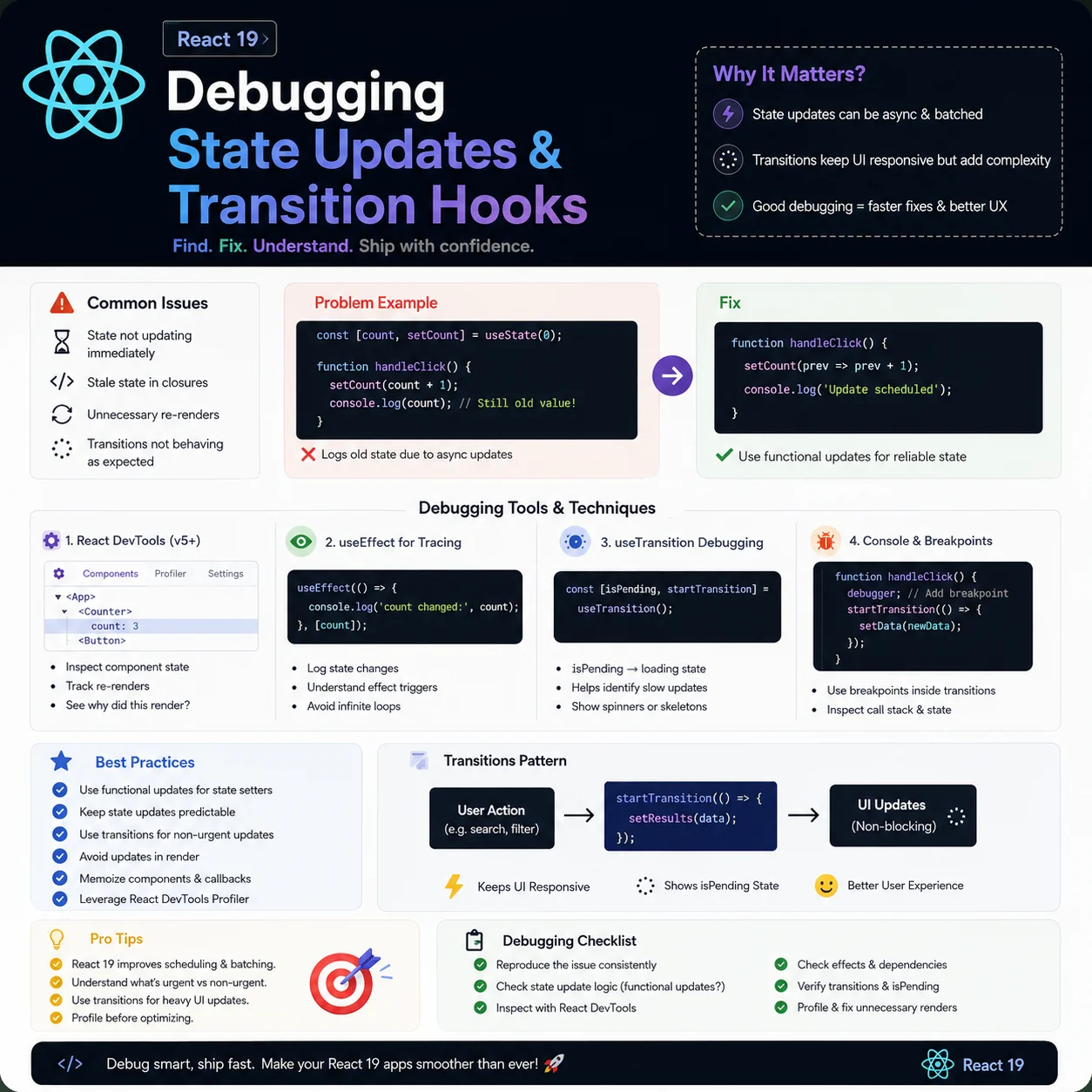
React 19 ships concurrent rendering for real, not just conference talks about it. The part that changed my day-to-day is **state transitions**. Before, a state update from a click or keystroke could block the main thread until React finished rendering — which is why search boxes stutter when you're filtering a big list.
Transitions let you mark an update as low priority. Wrap it in `startTransition` and React can delay, interrupt, or throw it away if the user does something else. The UI stays responsive even when the render tree is heavy.
Under the hood React splits work across fibers so high-priority stuff — typing, clicking cancel — wins over background re-renders. That's the mental model that finally clicked for me.
02useTransition now handles async properly
In React 18, `startTransition` only worked with synchronous state updates. React 19 lets you pass async functions inside the callback. If your transition kicks off an API call, state setters inside it get batched and the hook tracks the whole lifecycle.
That mostly kills the manual `loading` boolean pattern. While the promise is in flight, `isPending` is `true` automatically. Here's how I wire up a save button that doesn't freeze the rest of the form:
import { useState, useTransition } from 'react';

export default function UpdateUserForm() {
  const [isPending, startTransition] = useTransition();
  const [username, setUsername] = useState('');

  const handleSave = () => {
    startTransition(async () => {
      try {
        await saveUsernameToServer(username);
        alert('Username updated successfully!');
      } catch (err) {
        alert('Failed to save: ' + err.message);
      }
    });
  };

  return (
    <div>
      <input value={username} onChange={e => setUsername(e.target.value)} />
      <button onClick={handleSave} disabled={isPending}>
        {isPending ? 'Saving to Database...' : 'Save Name'}
      </button>
    </div>
  );
}03Forms got easier with useActionState
React 19 also ships `useActionState` (it was `useFormState` in early Next.js builds). It wraps your submit handler in an implicit transition and gives you back the action result, a dispatch function, and a pending flag.
Forms stop locking up during network calls without you wiring up extra state. Small thing, but I reach for it on every new form now.
import { useActionState } from 'react';

async function signupHandler(prevState, formData) {
  const email = formData.get('email');
  const res = await fetch('/api/signup', { method: 'POST', body: JSON.stringify({ email }) });
  return await res.json();
}

export default function SignupForm() {
  const [state, formAction, isPending] = useActionState(signupHandler, null);

  return (
    <form action={formAction}>
      <input name="email" type="email" required />
      <button type="submit" disabled={isPending}>
        {isPending ? 'Sending...' : 'Sign Up'}
      </button>
      {state && <p className="form-msg">{state.message}</p>}
    </form>
  );
}04useOptimistic for when you can't wait on the server
Optimistic UI is when you show the result before the server confirms it. React 19's `useOptimistic` hook does the boring part — render the optimistic state, roll back if the request fails.
Post a comment? It shows up immediately with a faded style. Server says OK? Full opacity. Server errors? It disappears. You'd write that by hand before; now it's a few lines.
import { useOptimistic } from 'react';

export function CommentList({ initialComments }) {
  const [optimisticComments, setOptimisticComments] = useOptimistic(
    initialComments,
    (state, newComment) => [...state, { text: newComment, pending: true }]
  );

  return (
    <ul>
      {optimisticComments.map((comment, index) => (
        <li key={index} style={{ opacity: comment.pending ? 0.5 : 1 }}>
          {comment.text}
        </li>
      ))}
    </ul>
  );
}05Gotchas I hit early on
Don't read updated state right after calling `startTransition`. React batches transition updates and runs them in the background — the variable on the next line still holds the old value.
Also don't nest multiple transitions for related updates. Put everything in one `startTransition` block so React can do a single concurrent pass instead of redundant render cycles.
06The search filter that stopped stuttering
I had a tools dashboard filtering 400+ rows on every keystroke. Typing felt laggy because each character triggered a full list re-render synchronously. Moving the filter state update into `startTransition` kept the input instant while the table caught up a frame later.
Pattern: keep the controlled input value in normal state for immediate feedback, derive the filtered list inside a transition from a debounced or secondary state. Users notice smooth typing more than they notice a 40ms delay on the table body.
07Pair transitions with Suspense for data fetches
When a transition triggers a fetch, wrap the result UI in `<Suspense fallback={...}>`. React 19 can show the previous UI while the new data loads instead of flashing a blank panel.
On a blog admin preview I built, tab switches between Markdown and rendered HTML used to white-screen for 200ms. Suspense plus a skeleton fallback made the swap feel intentional instead of broken.
08When I still avoid transitions
Do not wrap financial totals, form validation errors, or security warnings in transitions — those should render immediately. Low priority is for work that can wait: filtering, sorting, secondary panels, non-critical charts.
If the UI must never show stale data — like an OTP countdown or a payment status — use normal state. Transitions are a responsiveness tool, not a default for every `setState`.
09useDeferredValue for live search without transitions
Sometimes `useDeferredValue` is enough — defer the expensive derived list while the input updates immediately. I use it when the slow part is memoized filtering, not an async fetch.
Rule I follow: async save or fetch → `useTransition`. Heavy synchronous filter on big arrays → try `useDeferredValue` first. Simpler mental model, fewer pending flags to wire up.
10Migrating an older React 18 codebase
I upgraded a dashboard from React 18 to 19 without rewriting everything. Step one: find the three slowest interactions from user complaints. Step two: wrap only those updates in transitions. Step three: leave the rest alone until you have metrics.
Big-bang "make everything concurrent" refactors waste time. Target the list filters, tab panels, and save buttons that actually block typing — that is where React 19 pays off first.
11Suspense boundaries with transitions
When a transition loads async data, wrap the result in `<Suspense fallback={<Skeleton />}>`. Users keep seeing the old UI until the new data is ready — no white flash, no frozen input.
On an admin table I maintain, switching tabs used to unmount the whole page shell. Adding Suspense around the tab panel content plus `startTransition` on the tab click made switches feel instant even when the fetch took 300ms.
12Debugging pending state in DevTools
If `isPending` flickers too fast to see, artificially slow the async handler in dev with `await new Promise(r => setTimeout(r, 500))`. Confirm buttons disable, spinners show, and double-submit is blocked.
The bug I hit most: calling `setState` outside the transition callback for related fields — that update ran at high priority and defeated the purpose. Keep all coupled updates inside one `startTransition` block.
13Server Components vs client transitions
Transitions are a client-side React feature. In Next.js App Router, use them in client components that orchestrate UI state. Server Actions pair well with `useActionState` for forms; client transitions pair well with instant feedback while server work runs.
Do not wrap Server Component props in transitions — mark the interactive leaf as `'use client'` and keep data fetching in the server parent where possible.